> ## Documentation Index
> Fetch the complete documentation index at: https://docs.allyy.io/llms.txt
> Use this file to discover all available pages before exploring further.
# The Allyy data model
> The handful of entities every data source is mapped onto
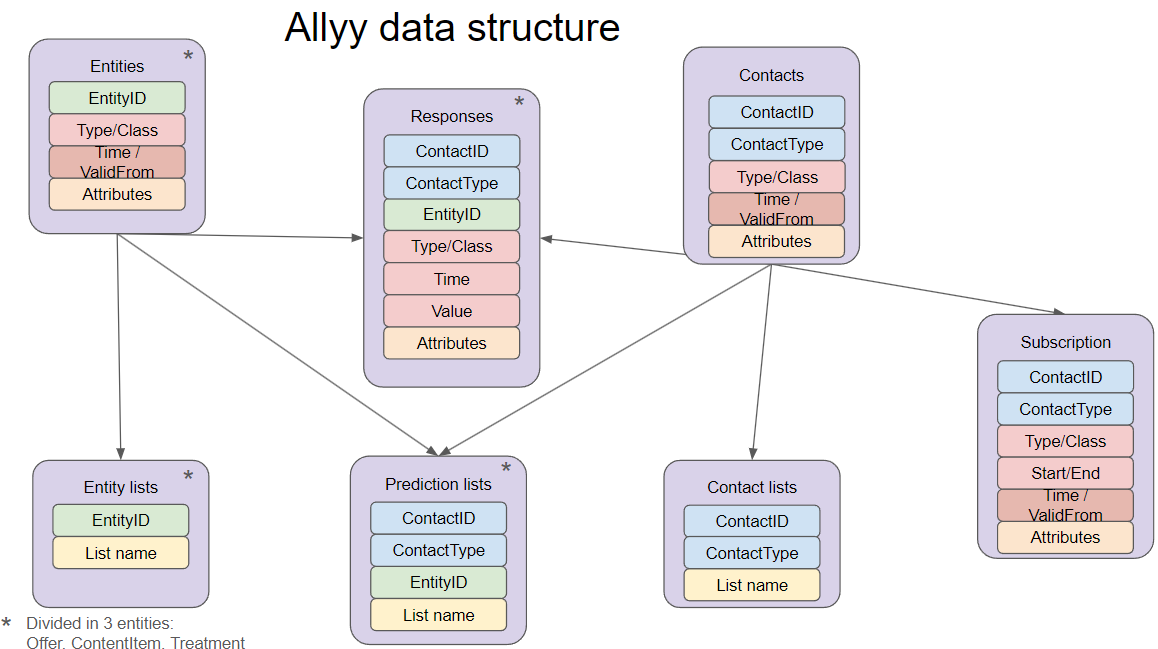
Allyy is generic: it doesn't care whether you're a wildlife charity or a hospital foundation. It achieves that by mapping every customer's data onto the same small set of entities. Understanding these makes data mapping, models and dashboards all click into place.
## The core entities
The people or organisations you engage — your supporters. Carry static attributes like age, gender, postcode, and acquisition source.
The campaigns a contact can be targeted by — an appeal, a mailing, a telemarketing or email campaign. One row per campaign, describing what it was. The "what we sent".
An interaction between a contact and an offer — a donation, a click, an open, a refusal. The "what happened". Responses carry a timestamp and, for donations, an amount.
A standing agreement — a recurring donation / direct debit / standing order — with a start date and an optional end date (open-ended while active).
**Lists** sit alongside these: a collection of contacts (or offers) used as the population for a model or a campaign — for example "everyone eligible for the spring appeal".
## How the entities relate
A **Contact** receives an **Offer**; their reaction is a **Response**; if they commit to give regularly, that's a **Subscription**. Models and analytics are built by combining these — for example:
* *DM propensity* learns from **Responses** to past **Offers**, per **Contact**.
* *Subscription churn* learns from **Subscriptions** and their **Responses** (payments).
* *Income concentration* (analytics) aggregates donation **Responses** across **Contacts**.
 ## Field categories
When you map a source, each column falls into one of these roles:
| Category | Examples |
| -------------------- | ------------------------------------------------------------------------- |
| **IDs** | `ContactID`, `OfferID` — the keys that link entities. |
| **Attributes** | age, gender, postcode, income index — descriptive fields. |
| **Classes & types** | offer type, content category, response type (donation / click / refusal). |
| **Valid from** | when a record became valid — lets Allyy reason about change over time. |
| **Mandatory fields** | required for an entity to be usable (e.g. subscription start date). |
| **Optional fields** | enrich an entity but aren't required (e.g. subscription frequency). |
## Why this matters
Because everything is expressed in these entities, **the same model and the same dashboard work for any customer** — only the mapping changes. Getting the mapping right (especially donation amounts, timestamps, and response types) is the single most important thing for accurate models and analytics.
Donations often live in more than one place — one-off donations, mailing responses, and recurring-donation payments. Make sure each is mapped so that **all** of it is captured, not just one channel.
Next: [Preparing your data](/data/data-requirements) · [Connect a data source](/processes/data)
## Field categories
When you map a source, each column falls into one of these roles:
| Category | Examples |
| -------------------- | ------------------------------------------------------------------------- |
| **IDs** | `ContactID`, `OfferID` — the keys that link entities. |
| **Attributes** | age, gender, postcode, income index — descriptive fields. |
| **Classes & types** | offer type, content category, response type (donation / click / refusal). |
| **Valid from** | when a record became valid — lets Allyy reason about change over time. |
| **Mandatory fields** | required for an entity to be usable (e.g. subscription start date). |
| **Optional fields** | enrich an entity but aren't required (e.g. subscription frequency). |
## Why this matters
Because everything is expressed in these entities, **the same model and the same dashboard work for any customer** — only the mapping changes. Getting the mapping right (especially donation amounts, timestamps, and response types) is the single most important thing for accurate models and analytics.
Donations often live in more than one place — one-off donations, mailing responses, and recurring-donation payments. Make sure each is mapped so that **all** of it is captured, not just one channel.
Next: [Preparing your data](/data/data-requirements) · [Connect a data source](/processes/data)