> ## Documentation Index
> Fetch the complete documentation index at: https://docs.allyy.io/llms.txt
> Use this file to discover all available pages before exploring further.
# Data mapping
> Documentation for mapping data towards Allyys data structure
export const ImageText = ({imageUrl, imageAlt, children, rightImagePosition = false}) => {
const getFullImageUrl = url => {
if (typeof window !== 'undefined' && (window.location.hostname === 'localhost' || window.location.hostname === '127.0.0.1' || window.location.hostname.startsWith('192.168.') || window.location.hostname === '[::1]')) {
return url;
}
return `https://mintlify.s3-us-west-1.amazonaws.com/allyyio${url}`;
};
const fullImageUrl = getFullImageUrl(imageUrl);
const containerStyle = {
display: 'flex',
alignItems: 'center',
flexDirection: rightImagePosition ? 'row' : 'column',
width: '100%'
};
const imageStyle = {
width: '100%',
marginRight: rightImagePosition ? '20px' : '0',
marginTop: rightImagePosition ? '0' : '10px'
};
const textStyle = {
width: rightImagePosition ? '80%' : '100%'
};
return
{children}

;
};
Integrating data into the system is key to making your machine learning models work effectively. This process involves setting up a **data source** that can be automated once configured. All operations occur at the **dataset level**, so understanding how to create and manage datasets and data sources is crucial.
***
## **Data Mapping: Entities Description**
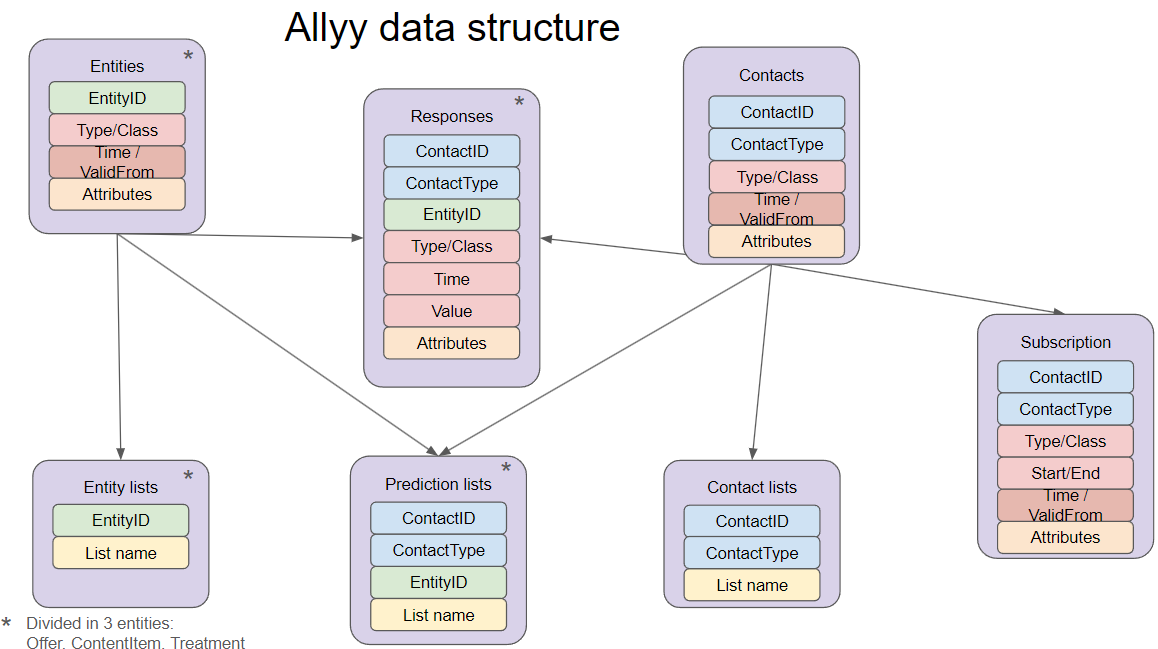
Once you have a preview of the data, you need to map it to the **allyy data structure**, which organizes contact and interaction data.
### Revised Terminology for Clarity:
* **Contacts**: Individuals or entities that will interact with your system.
* **Offers/ContentItem/Treatment**: Objects or items that a contact can interact with. Examples include Offers (e.g., promotions), ContentItems (e.g., articles), and Treatments (e.g., telemarketing).
* **Responses**: Captures interactions between a contact and an object. This could include positive actions (e.g., clicks, donations) or negative actions (e.g., unsubscribes).
* **Subscriptions**: Represents agreements between a contact and an object (e.g., subscriptions to services). They can have start and end dates, or be ongoing if the end date is undefined.
* **Lists**: Collections of contacts or objects used in models or workflows (e.g., a list of target customers for a prediction).
 ***
## **Data Mapping Fields**
When mapping your data to the **allyy data structure**, there are different categories of fields:
* **IDs**: Unique identifiers for contacts, offers, or responses (e.g., ContactID, OfferID).
* **Attributes**: Characteristics of the data (e.g., age, gender, postal code).
* **Classes and Types**: Fields that help categorize data (e.g., Offer Type, Content Category).
* **Valid From**: Indicates when the data is valid from, useful for tracking changes over time.
* **Mandatory Fields**: Required fields that must be mapped (e.g., Subscription Start Date).
* **Optional Fields**: Enrich the entity with additional information but are not required (e.g., Subscription Frequency).
For examples of the source data NGOs typically provide for each entity, see [Preparing your data](/data/data-requirements).
***
***
## **Data Mapping Fields**
When mapping your data to the **allyy data structure**, there are different categories of fields:
* **IDs**: Unique identifiers for contacts, offers, or responses (e.g., ContactID, OfferID).
* **Attributes**: Characteristics of the data (e.g., age, gender, postal code).
* **Classes and Types**: Fields that help categorize data (e.g., Offer Type, Content Category).
* **Valid From**: Indicates when the data is valid from, useful for tracking changes over time.
* **Mandatory Fields**: Required fields that must be mapped (e.g., Subscription Start Date).
* **Optional Fields**: Enrich the entity with additional information but are not required (e.g., Subscription Frequency).
For examples of the source data NGOs typically provide for each entity, see [Preparing your data](/data/data-requirements).
***