

Model Evaluation Dashboards
The Model Evaluation section provides a set of dashboards that allow users to assess how a model performs across different business objectives. Each dashboard focuses on a specific prediction type and business case, helping users understand model quality, behavior, and impact.Prediction Types and Business Cases
The platform supports two main prediction types, each with its own set of business cases.Classification (Propensity / Probability)
These models predict the likelihood of a specific user action or outcome. They are used to prioritize outreach, optimize campaigns, and understand customer behavior. Available classification business cases: DM Propensity - Likelihood that a customer responds to direct mail. TM Reachability - Probability that a customer can be reached via telemarketing. TM Conversion - Likelihood that a telemarketing call results in a conversion to a monthly donor. SMS Conversion - Probability that an SMS campaign leads to a desired action. Email Open - Likelihood that a customer opens an email. Email Click - Likelihood that a customer clicks on an email link. Subscription Churn - Probability that a subscriber cancels their subscription. Middle Donor - Likelihood that a donor falls into the middle-donor segment. Active Donor - Probability that a donor remains active. Subscription Acquisition - Likelihood that a customer becomes a subscriber.Regression (Value / Amount)
These models predict a numerical value rather than a probability. They are used to estimate expected revenue, donation amounts, or customer lifetime value. Available regression business cases: DM Expected Amount - Expected donation amount from direct mail. TM Expected Amount - Expected revenue from telemarketing. SMS Expected Amount - Expected revenue from SMS campaigns. Lifetime Value - Estimated long-term value of a customer.Response
Audience Classification (Propensity / Probability) DM Propensity TM Reachability TM Conversion SMS Conversion Email Open Email Click Subscription churn Middle donor Active donor Subscription Acquisition Regression (Value / Amount) DM Expected Amount TM Expected Amount SMS Expected Amount Lifetime valueClassification — Response
DM PropensityTM Reachability
TM Conversion
SMS Conversion
Email Open
Email Click
Classification — Audience
Subscription churnMiddle donor
Active donor
Subscription Acquisition
Regression — Response
DM Expected AmountTM Expected Amount
SMS Expected Amount
Regression — Audience
Lifetime valueSelecting a Business Case on the Home Page
- Home models
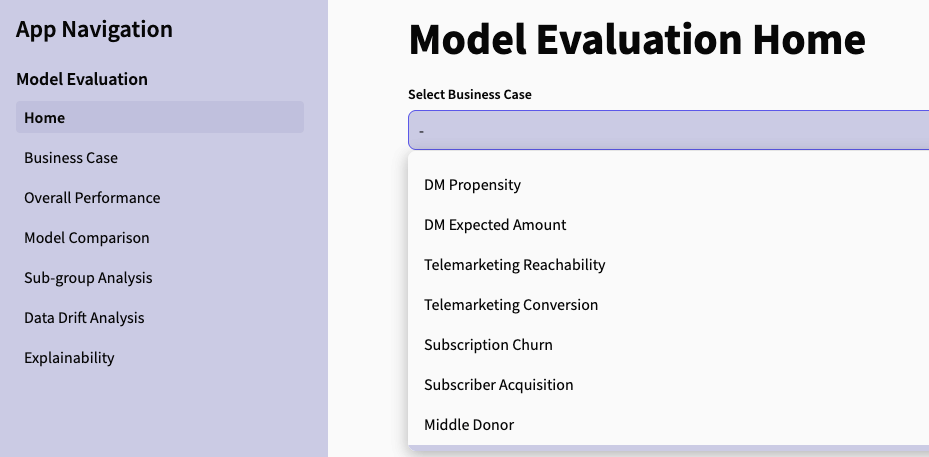
How it works
The user selects one of the available business cases from the dropdown. Once selected, the platform loads the relevant dashboards and metrics. All navigation items (Overall Performance, Model Comparison, Sub-group Analysis, etc.) will now display results for the chosen business case.Why this step matters
Each business case has its own:- KPIs
- evaluation logic
- performance metrics
- visualizations
- explainability outputs